
Cadform for SolidWorks
Find it before you model it.
A Windows app that reads your SolidWorks library, groups parts by shape, and lets you search by features and sizes, so you reuse existing parts instead of drawing duplicates.
The problem
File names like P-10423.SLDPRT say nothing about the shape. When engineers can't find a part, they model it again: a new part number, a new drawing, and another near-copy in the library.
How it works
Scan
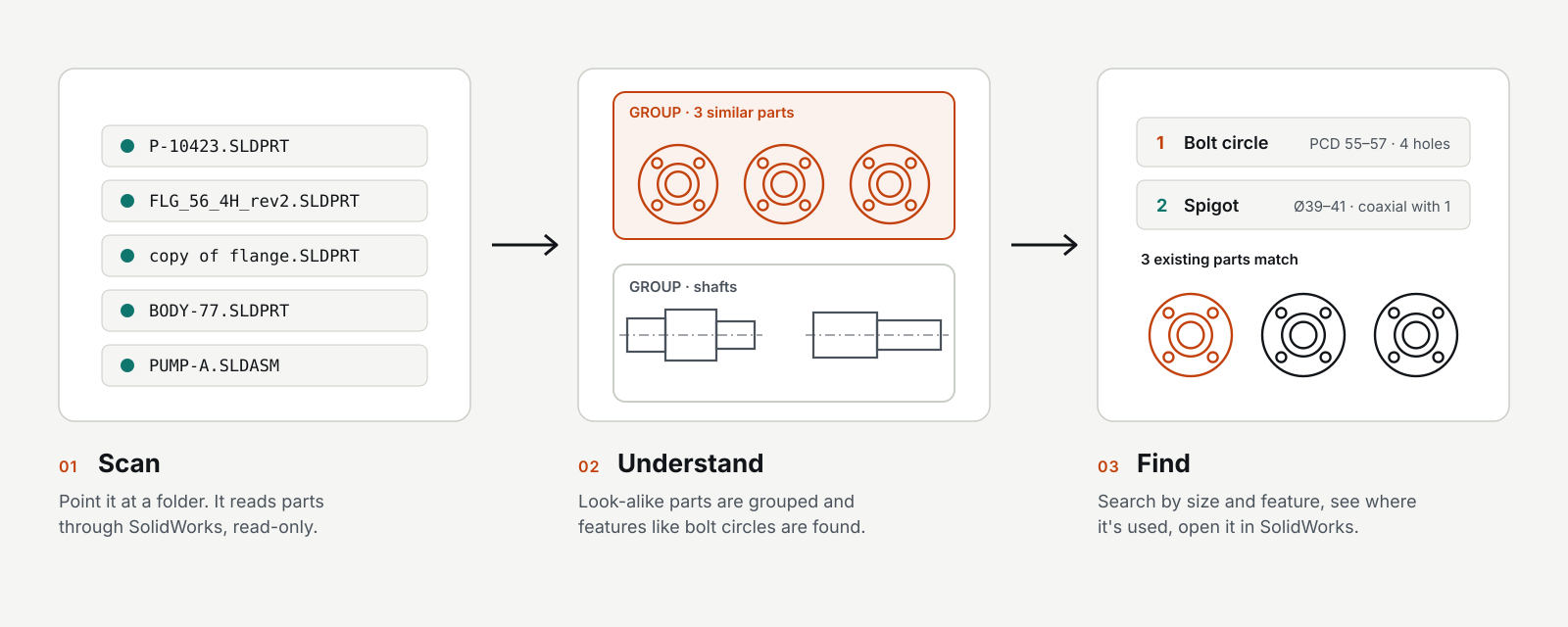
Point Cadform at a folder. It opens each part and assembly through SolidWorks and records its faces, edges, dimensions, configurations and references. Batch mode lets you scan a whole library unattended.
Group by shape
Parts with the same shape land in the same group, whatever they're called and however they were modeled. Moved, rotated and mirrored copies still match.
Name dimensions once
Pick "OD" or "Overall length" on one part of a group. Cadform applies the rule to every member, so you can search the library by size.
Compare revisions
See exactly which faces changed between two parts, named the way SolidWorks names them: holes, counterbores, slots, pockets, bosses, grooves, fillets, chamfers.
Check assemblies
Contact, clearance, interference and seal-squeeze checks, plus simulated linear and rotary motion.
Where-used
Find every assembly that uses a part before you change it, so you know it's safe to reuse.
Read-only
Cadform reads your parts through SolidWorks and never changes your CAD files.
Is it safe to install?
It's a fair question for software from a small developer. When the demo is released, this section will spell out exactly what it puts on your PC, so you can decide before you download.
SolidWorks versions
Developed and tested on SolidWorks 2022. The full list of supported versions will be published with the demo.
What goes on your PC
Every file and component the demo adds will be listed here, with versions, before you download.
Signed by DatumKey, LLC
The demo will be code-signed. Windows will show Verified publisher: DatumKey, LLC before anything runs. If it shows anything else, don't run it, and email support@datumkey.com.
Free demo: coming soon
The demo isn't ready yet. Email support@datumkey.com and I'll let you know when it's out. Your address is only used to tell you about Cadform.